Your cart is currently empty!
Search results for: “R”
-

5 Reasons Why a Video Doorbell is a Great Gift
Thinking about a video doorbell for a loved one?
You’re not alone. This type of video camera is one of the most popular smart-home products of the year. The reason why is because it’s a doorbell, a video camera, and a two-way communications device all wrapped into one.
5 Really Useful Things You Can Do With a Video Doorbell
1. Answer the door from anywhere in the world
- When a visitor rings yourvideo doorbell, it chimes like an ordinary doorbell but you also get an alert on your smartphone app.
- Tap the alert and you’ll see a live video stream of your visitor. They can’t see you but you can see them, and you can have a conversation using the doorbell’s two-way audio feature.
2. Secure a delivered package
- Have you ever experienced the anxiety of having a valuable package being left on your porch when you’re not there? With a video doorbell installed as part of your smart home security system, you won’t need to worry.
- When the delivery driver rings the bell, you can ask them to leave the package inside, unlocking your front door with thesmart lockand disarming your security system all through one app. No smart-locks? You can still instruct the delivery person to place the package in a different location or ask a friend to claim it.
3. Catch a suspicious person in the act
- A video doorbell is actually a complete security camera, able to capture motion-triggered clips, alert you, and store your clips for later viewing.
- It’s a great way to keep an eye on activity around your porch and driveway, which are the busiest areas on your property.
- Should your camera catch something —a suspicious caller or a package thief, you’ll find it easy to download the clip and share it with your local police department.
4. Keep up with the kids
- You can use your video doorbell as a tool for peace of mind. For example, your doorbell camera can send you a daily video alert when your kids arrive home from school.
- Kids also enjoy using video doorbells as a one-way ‘FaceTime’ device, ringing the bell when you’re at work to say hello and give you a wave.
5. Sleep undisturbed
- Naptime is the worst time imaginable for a loud doorbell to chime through your home. Simply put your video doorbell in ‘Do Not Disturb’ mode which switches the chime off, but still sends you a text alert when a visitor rings the bell. Then just open your app, see who’s there, and decide whether to answer or not.
Give EMC Security a call to order your video doorbell at 770-963-0305 today – OR order online right now for just $149.
-

Can EMC Security Monitor My Security System?
More homes than ever before have pre-installed security systems, or the home is pre-wired and ready for security equipment to be installed.
This begs the question that is often confusing to consumers, “Do I have to use the company that installed the equipment to monitor it?”
No, you don’t.
With just a few exceptions, EMC Security can monitor most existing home security systems. This is good news if you’re happy with the existing security system in your home but dissatisfied with your current monitoring service, or especially if you’re moving into a home with a pre-installed system.
What is Monitoring?
When your alarm is activated (by a sensor striking on a door or window), an alarm is sent to the central monitoring station for immediate action. This includes contacting you at pre-determined phone numbers (EMC Security’s alarm response is less than 14 seconds on average) and relaying your address and the type of emergency to police, fire, or medical authorities.
Some systems are only supported by the company that installed them. These systems are called proprietary systems. Some well-known companies block other companies from monitoring their systems with proprietary systems. However, there are many other system types that are non-proprietary which makes choosing a monitoring provider much easier.
If you’re moving into a home with an existing security system, the control panel should give you a make and model number to assist with your research. This information is all EMC Security needs to determine if we can monitor your system.
How to Switch to EMC Security
As part of our process of activating an existing security system, our customers receive:
- A full system diagnostic
- Reprogramming to communicate to EMC Security monitoring centers
- Full system communications test
- Panel battery replacement if needed
- Homeowner training on full system operation
- Yard signs and window decals

-

Number One Safest City in Georgia
With a population of 34,641, Kennesaw, GA is ranked the safest city in Georgia.
Kennesaw is part of Metro Atlanta and is home to the Kennesaw Mountain National Battlefield Park and Kennesaw State University. Residents have one of the lower average poverty rates in the state with a highly educated populace.
Statistic CountRaw Kennesaw/ 100k People Georgia/ 100k People National/ 100k People Total Crimes Per 100K 532 1,535.8 2,716.5 2,476.7 Violent Crime 48 138.6 340.7 366.7 Murder 1 2.9 6.2 5.0 Robbery 8 23.1 75.0 81.6 Property Crime 484 1,397.2 2,375.8 2,109.9 Burglary 34 98.1 372.1 340.5 Car Theft 33 95.3 223.9 219.9 More Safe Cities in Georgia:
- Kennesaw (Pop. 34,641)
- Grovetown (Pop. 14,918)
- Acworth (Pop. 22,921)
- Alpharetta (Pop. 67,411)
- Glennville (Pop. 5,084)
- Woodstock (Pop. 33,470)
- Hampton (Pop. 8,044)
- Tyrone (Pop. 7,451)
- Braselton (Pop. 12,297)
- Milton (Pop. 40,067)
Image source : http://www.kennesaw.com/attractions/the-general/

-

Most Dangerous Cities in Georgia – 2021 Edition
Georgia is full of beautiful landscapes, gorgeous beaches, and historical towns. But it also has a few cities that have placed Georgia in the top 3rd of the nation for most dangerous states.
Based on the latest FBI crime stats for Georgia (2021 Crime in the United States Report), below is a list of the most dangerous cities in Georgia.
The list ranks Georgia cities with over 5,000 people and is based on a ratio of both violent and property crimes per population.
Be safe out there – no matter where you are!
City Violent Crime (per 100k) Property Crime (per 100k) Notes 1. College Park 1,158 6,794 Ranked #2 last year, and home to Hartsfield Jackson Airport, the busiest airport in the word. College Park is the most violent place in Georgia. 2. Americus 840 5,526 Also ranked higher than last year, Americus is the Home to Habitat for Humanity’s international headquarters, and the highest incidents of reported rape crimes in the state. 3. Albany 1,053 4,603 Georgia’s 3rd largest city, Albany has high violent crime and property crime rates. 4. Forest Park 720 4,454 Not even on the list of the top 10 last year, Forest Park has a high incidence of violen crimes, including rape and murder. 5. Warner Robins 548 4,710 Burglary and rape crimes dominate this city, which is the 2nd largest city in Georgia. 6. Douglasville 525 5,816 Douglasville rose in the ranks from 15th last year due to a high property crime rate (on average 6 per day). 7. Morrow 419 9,062 Morrow is actually the least violent city on the list but the property crime is the highest for the state, more than 300% higher than the national average. 8. Bainbridge 675 3,912 Located in SW Georgia with the 2nd highest rate of burglaries. 9. Waynesboro 426 3,916 Unfortunately this little city rose 22 places from last year. Need something positive to chew on?
Here are the safest cities in Georgia:
- Kennesaw
- Grovetown
- Acworth
- Alpharetta
- Glennville
- Woodstock
- Hampton
- Tyrone
- Braselton
- Milton
Source: https://ucr.fbi.gov/crime-in-the-u.s
Get Started Today!
Complete and submit this form and an EMC Security specialist will follow up.
-

Holiday Fire Prevention Tips for Your Home
Holiday Lights
- Maintain Your Holiday Lights
Inspect holiday lights each year for frayed wires, bare spots, gaps in the insulation, broken or cracked sockets, and excessive kinking or wear before putting them up. Use only lighting listed by an approved testing laboratory.
- Do Not Overload Electrical Outlets
Do not link more than three light strands, unless the directions indicate it is safe. Connect strings of lights to an extension cord before plugging the cord into the outlet. Make sure to periodically check the wires – they should not be warm to the touch.
Do not leave holiday lights on unattended!
Holiday Decorations
- Use Only Nonflammable Decorations
All decorations should be nonflammable or flame-retardant and placed away from heat vents. If you are using a metallic or artificial tree, make sure it is flame retardant.
- Don’t Block Exits
Ensure that trees and other holiday decorations do not block an exit way. In the event of a fire, time is of the essence. A blocked entry/exit way puts you and your family at risk.
- Never Put Wrapping Paper in the Fireplace
Wrapping paper in the fireplace can result in a very large fire, throwing off dangerous sparks and embers that may result in a chimney fire.
Candle Care
- Avoid Using Lit Candles
Consider using battery-operated flameless candles, which can look, smell and feel like real candles.
- If You Do Use Lit Candles
Make sure candles are in stable holders and place them where they cannot be easily knocked down. Keep candles at least 12 inches from anything that can burn. Never leave a room or go to bed with candles burning.
- Never Put Lit Candles on a Tree
Do not go near a Christmas tree with an open flame – candles, lighters or matches.
Please never underestimate the power of having fire and smoke detectors as a part of your security system. Fire and smoke monitoring is a service provided whether the customer’s security system is armed or disarmed.
For more details on how to add fire monitoring to your home, please contact an EMC Security representative at 770-963-0305.
All EMC Security customers receive fire monitoring at no additional cost.
-

How to Use Your Fire Extinguisher
Every Moment Counts. Especially when there’s a fire. Criminals are selective about what they take, but a fire takes it all. It’s important to have the proper equipment in your home to protect yourself and your loved once should a fire occur.The independent review site, Safewise.com, interviewed fire-fighters to determine which fire extinguisher they’d recommend.
Their pick: Amerex B402.
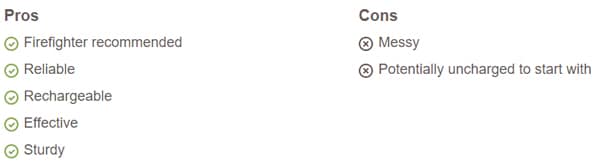
Amerex B402 is one of the most recommended fire extinguishers on the market, and its steel casing and aluminum valves make it durable enough to withstand a fire and be recharged for future use.
Other top contenders:
- First Alert Standard Home Fire Extinguisher: Best for Budget
- The Fireman Fire Extinguishing Spray: Best for Convenience
- First Alert Tundra Spray: Portable Pick
- Kidde ABC Multipurpose Fire Extinguisher: Disposable Pick
Types of Fires Extinguishers & Ratings
Before you purchase a fire extinguisher, it’s important to understand the different types of fires. Chemical fire extinguishers are filled with different fire suppressants, and choosing a type of extinguisher with the wrong contents could actually make a fire worse (like throwing water on a grease fire).
Household fires fall under three classifications, depending on the type of fuel burning. The most common fire extinguisher classifications are A, B, C, and K. Class A-B-C fire extinguishers will handle most household fires, but just to be on the safe side, it’s smart to also have a K-rated fire extinguisher on hand for your kitchen.
- Class A: Solid combustible materials that are not metals, like wood, paper, cloth, plastics, and rubber.
- Class B: Flammable liquids, like gasoline, oil, grease, and paints.
- Class C: Electrical equipment, like appliances and outlets.
- Class K: Cooking oils and greases, animal fats, and vegetable fats.
Where to Store Your Fire Extinguisher
It is best to store your extinguisher in your kitchen, 5–8 feet from potential fire sources like deep fat fryers, fireplaces, or clothes dryers. This way you can access them quickly and safely in case of a fire.
Make sure that there is always a fire extinguisher no farther than 40 feet away from any location in your home.
While it’s very important to have a fire extinguisher readily available in your home, it’s equally important to have smoke detectors installed. EMC Security recommends installing at least one monitored smoke detector outside the bedrooms. This way, if there’s a fire, we’ll work to get you the help you need, while you can concentrate on getting your loved ones to safety.
EMC Security monitors for fire at no additional monthly cost.
-

Home Fire Safety Tips
The room was fully ablaze in 3 minutes.
A recent Good Morning America investigation demonstrated how much more vulnerable today’s modern home is to fire than its older counterparts.
A group of researchers set a fully furnished 12×16 foot room (similar to one found in a modern, open floor plan) on fire to see how long it took for the room to reach a “flash point,” or the moment in a room where everything is engaged in a fire. The result? The room was fully ablaze in 3 minutes.
Read below for tips on how you can prevent this from happening in your home.
1. The first safety tip is a simple one that many homeowners forget—close the interior doors. When each room is compartmentalized, fire has less room and oxygen and grows more slowly, giving the family more time to get out safely. Get into the habit of closing doors (especially bedroom doors) at bedtime.
2. Get fire resistant clothing and furniture. When you’re shopping for new furniture or appliances, check the manufacturer’s label to see if the item has been tested for its resistance to fire.
3. Dense, heavy, solid materials will burn more slowly, so consider the heft of building materials if you’re building or remodeling a home. Heavier doors, handles, and non-synthetic construction materials will slow the spread of flames.
4. Create a fire escape plan. As the safety window for escaping a home fire shrinks, it’s more important that ever to create a fire escape plan for your family that includes two exit points for every room, and a plan for meeting up outside. An escape ladder is a must for 2nd floor bedrooms.
5. The NUMBER ONE thing you can do to protect your home: install a fire monitoring system. EMC Security monitoring includes fire monitoring. With the purchase of a monitored smoke detector (from $79) you can help save your home and everyone inside.
Call 770-963-0305 and schedule a free consultation to find the fire monitoring and intrusion alarm system that fits your home and your family.
-

No Contract Required
What’s the big deal about a security contract?
Think about this scenario:
You hired a company to provide you service on a monthly basis. You have technology in your home that needs to work, and you are placing your trust in fellow human beings to do what they are paid to do in an emergency situation.
What if you get bad service? What if your system fails and you weren’t notified? What if the company is unresponsive, or slow to help you when you need it?
Unlike other monthly home services like trash service, or pest control, home security service could be extremely costly if something goes wrong (and I’m not just talking about monetary costs). It is really important to understand WHO you hire to provide monitoring service – especially if they lock you into a contract.
The fact is, you can’t purchase most professionally installed security systems on the market without agreeing to at least a 36-month contract. This practice has been the standard for years so the providers can offer low up-front installation and equipment fees. The problem with this is once the equipment costs would be paid off, the high monthly fee (absorbing the equipment costs) does not reduce.
Since our inception in 1998, EMC Security has offered no-contract monitoring service. You pay for your equipment upfront with monitoring and communication charges paid on a month to month basis, with the option to cancel any time.
EMC Security puts customer satisfaction above everything else because we know that happy customers are key to maintaining a successful business. By endorsing highly ethical business practices, both within our organization and across our customer and potential customer base, we send our message as a standard, not as a fallback.
This is very important when the lives of our customers are at stake.
-

Prices are Rising Everywhere so EMC Security is the Better Choice
The reality of the world-wide microchip shortage, global labor shortage and other supply chain disruptions has manufacturers – from consumer electronics and appliances to automobiles and industrial capabilities – in a bind trying to fulfill demand. Simple economics proves that when demand is high and supply is low, prices go up. It’s happening in every aspect of our lives.
Security technology manufacturers have announced at least one, but in some cases, two prices increases in 2021. Home security companies all over the U.S. are facing price increases and are passing the cost to consumers.
EMC Security has a plan to protect our low prices.
- Internally, our team is negotiating exemption and/or lower percentage increases with our manufacturing partners.
- Our famous “no contract” option provides more value to consumers than ever before. We give our customers control to decide if they want to do business with us. Because customers can cancel any time, we work hard to ensure our level of customer service is at its highest for each and every interaction.
- EMC Security protects our customers and gives back to the community we serve.
- As a local company, we hire local people to service local families and businesses – we are part of this community and we do all we can to buy local and support the community.
- Every employee passes background checks, drug screens, and driving records.
- We notify customers if we don’t receive a test signal in more than 30 days. Customer security systems are tested for signals to confirm the system is properly functioning. Other companies don’t provide regular testing like this.
- We employee a team of 7 in-house technical support representatives. Trained security technicians are available at no cost to our customers to provide telephone technical support. This could save our customers time and money associated with a site visit to trouble-shoot or repair their system.
- Free EMC Text-Alert is a service no other company offers at no cost. This service allows customers to make a decision quickly with those on their contact list whether to dispatch or cancel an alarm – speeding up the process.
-

How to Prevent a False Alarm
Statistics show that home alarms have been proven to reduce the likelihood of home intrusions.
Savvy burglars know to choose homes with the course of least resistance, thereby avoiding homes with security measures such as outdoor cameras, motion activated security lights, and burglar alarms — all of which, work in unison to keep your property safe. Home security alarms alert you and your security monitoring company that your home has been breached, reducing the risk of further damage. Despite all of the good things alarms do for us as homeowners, it can be annoying when your security system is set off accidentally.
There are many reasons why false alarms. For instance, a large proportion can be blamed on homeowners forgetting to disarm the system prior to letting the dog out or empty the trash. Another aspect could be entering the wrong passcode.
So, how can we minimize these occurrences and prevent the frustration which usually accompanies falsely activated alarms?
Residential False Alarm Prevention Guide
Before you activate your system:
- Lock all protected doors and windows.
- Educate family members on
alarm system and usage. - Contact EMC Security if you have any concerns about the proper
functionality your system. - Notify EMC Security if you plan any renovating or remodeling your home.
- Educate family members on what to do if your alarm is accidentally triggered.
- Use the EMC Text Alert app to chat with your emergency contacts when your alarm is triggered and respond appropriately from your phone.
- First, don’t panic, there is time. Enter your disarm code (carefully) to reset your system. Remember, if there were a burglar, he or she would not know your code. Do not write it on your keypad.
- Call EMC Security at 1-888-745-4733 or wait for us to call you. Give your password — this is different from your disarm code.
Make sure that anyone who has keys to your home KNOWS how to operate the alarm.
Commercial False Alarm Prevention Guide
Tips for Commercial Businesses
- Be sure all employees are thoroughly trained before attempting to use the alarm system. Hold monthly training sessions.
- Look for items that can move within the “view” of your motion detectors, causing false alarms fans, heaters, hanging signs, seasonal decorations, balloons, curtains, plants, etc.).
- Confirm that special consideration has been given to the installation of motion detectors in high traffic areas with overhead doors, large exhaust fans or ceiling vents which allow the entry of birds.
- Ensure all doors and windows are secure and locked before arming your system.
- Don’t change pass-codes without advising EMC Security.
- Train new users thoroughly, notifying EMC Security of new users.
- Service and maintain your system (including batteries) regularly before false alarms occur.
- Upgrade old alarm systems to current equipment conforming to Security Industry Association (SIA) false alarm prevention standards, further reducing false alarms.
Every municipality in Georgia has alarm registration requirements. Some have false alarm ordinances as well. Make sure you understand your ordinance and fee guidelines before installing a security system in your home or business.